











Solitaire - Classic Card Games


Installs
10M+Category
OfflineContent Rating
Everyone
Screenshots

What This Game Is About
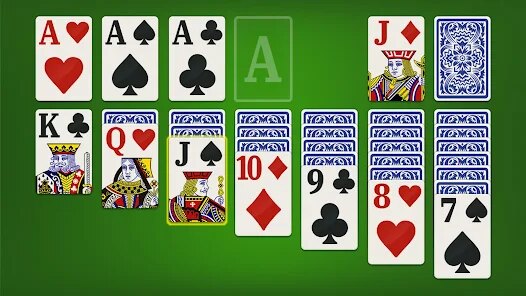
Solitaire - Classic Card Games is a card game for your phone. It is the classic solitaire game you know. You play by moving cards around. The goal is to sort all cards into four piles. Each pile must have cards of one suit. You start with cards in seven columns. Only the top card in each column is face up. You can move cards between columns. You build down in alternating colors. Move a king to an empty column to start a new pile. The game ends when all cards are in the foundation piles. This is the classic Klondike solitaire rules. Millions of people play this game every day. It is a great way to pass time. The game is simple to learn but fun to master. You can play it anywhere on your phone. It is perfect for short breaks or long waits. The game has clean graphics and smooth controls. It feels just like playing with real cards. The app is free to download and play. It does show some ads during gameplay. You can remove ads with a small purchase. Most players enjoy the free version. The game is very popular on mobile devices. It has a high rating from many players. People love its classic and simple style.
You play Solitaire - Classic Card Games by tapping and dragging cards. Tap a card to select it. Then drag it to where you want to move it. The game will only allow legal moves. You can tap the deck in the top left to draw new cards. You draw cards one or three at a time based on your settings. Use the undo button if you make a mistake. The game keeps your score based on time and moves. Try to finish the game quickly for a higher score. You can also play without a timer for a relaxed game. The game has been downloaded millions of times. It is a top card game in the app stores. The app contains ads between games. These are usually short video ads or banners. The ads support the free game development. You can play an unlimited number of games. There is no limit or energy system. You can always start a new game instantly. This makes it great for many quick sessions.
You can download Solitaire - Classic Card Games from Google Play for Android or the App Store for iPhone. Search for "Solitaire - Classic Card Games" by Oakever Games. Android players can also get the latest APK file on this page. You can install the APK after downloading it. Then you can play the game right away. Other similar games are Microsoft Solitaire and Solitaire by MobilityWare. This game is different because it is very lightweight and fast. It does not require a lot of phone storage. It runs smoothly on older Android phones too. The design is very clean and not cluttered. It focuses purely on the classic solitaire experience. Unlike some versions, it does not have many complicated extra modes. It is just the traditional game you remember. This makes it perfect for purists who want the original game. Try the free download today and see if you can win every game.
How To Get Started?
❓ Where do I download the game?
You can get a free download of Solitaire - Classic Card Games from your app store. Android players can find the latest APK on this page. Download the file and install it on your device. Then you can play the classic card game immediately after install.
❓ How do I install it on my phone?
For the APK, allow installations from unknown sources in your Android settings. Then open the downloaded file and follow the on-screen steps. The installation only takes a few moments. Soon you will be ready to play Solitaire - Classic Card Games.
❓ What will I see when the game opens?
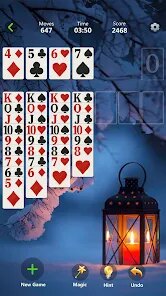
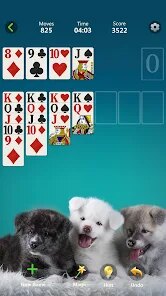
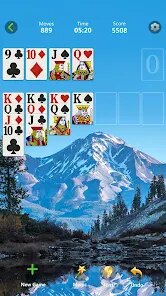
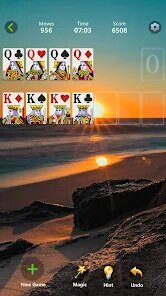
When Solitaire - Classic Card Games opens, you see the main game board. The seven columns of cards are at the bottom. The four empty foundation piles are at the top right. The deck for drawing new cards is at the top left. A menu button and score are also on the screen.
❓ How do I control the game?
You control Solitaire - Classic Card Games with simple tap and swipe gestures. Tap a card to pick it up. Swipe or drag the card to move it to a new column or foundation. Tap the deck to draw new cards. The controls are very intuitive for mobile play.
❓ What can I do inside the game?
Inside Solitaire - Classic Card Games, you can play the classic Klondike solitaire. You can change settings to draw one or three cards. You can use hints or undo moves. You can view your statistics and win percentage. The main action is sorting all the cards into the four suits.
❓ Can I play on Android or iPhone?
Yes, Solitaire - Classic Card Games is available for both Android and iPhone. Android users get it via Google Play or APK. iPhone users download it from the iOS App Store. The game experience is nearly identical on both platforms for all players.
Download Apk File
Online Games








Disclaimer
1 . Tikagames does not represent any developer, nor is it the developer of any App or game.
2 . Tikagames provide screenshots, historical version Apk, links and other information, which we collected from Google Play. We will also add our own reviews to provide users with more information to choose.
3 . All trademarks, registered trademarks, brand names and company names or logos appearing on the site are the property of their respective owners.
4 . Tikagames abides by the federal Digital Millennium Copyright Act (DMCA) by responding to notices of alleged infringement that complies with the DMCA and other applicable laws.
5 . We guarantee the security of apk files downloaded from our site and also provide the official download link at Google Play Store and App Store.
6 . If you are the owner or copyright representative and want to delete your information, please contact us [email protected].
7 . All the information on this website is strictly observed all the terms and conditions of Google Ads Advertising policies and Google Unwanted Software policy.