








Goods Story: Sort Puzzle


Installs
1M+Category
OfflineContent Rating
Everyone 10+
Screenshots
What This Game Is About
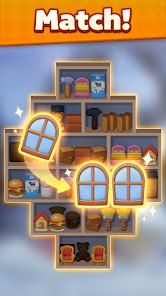
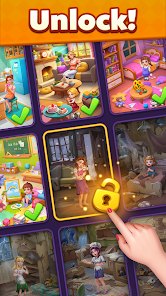
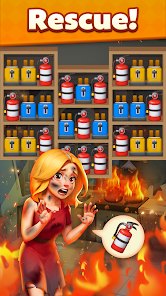
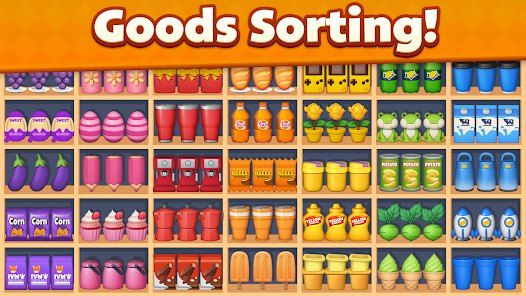
Goods Story: Sort Puzzle is a casual puzzle game. It is a sorting and matching game. You sort goods on shelves. The goods are food and small items. Each level gives you a messy shelf. You must move items to the right spot. The game is calm and slow. It is easy to learn. It is good for short breaks. Many people call Goods Story: Sort Puzzle a simple sorting game. You will see clear colors and soft shapes. The goal is to make every shelf neat. This game fits people who like order. It also fits people who like light puzzles. You do not need fast hands. You do not need deep plans. You just pick and place goods.
You play by tapping and dragging goods. You move one item at a time. Then you place it where it belongs. Some levels have boxes and baskets. You sort them too. The game shows you hints if you feel stuck. Goods Story: Sort Puzzle has many levels to play. The levels get a bit harder over time. The game has over one million downloads on Google Play. That shows many people enjoy it. The game has ads. Ads show between levels or at rest points. They do not block your taps in the middle of a sort. You can play without stress. You can play for one minute or ten minutes.
You can get Goods Story: Sort Puzzle from Google Play or the App Store. Android players can get the latest apk for Goods Story: Sort Puzzle on this page and install it. That is a free download, and you can play right after install. Some similar games are Sort It 3D and Goods Sort. Sort It 3D feels more like a 3D match game. Goods Sort feels more busy and fast. Goods Story: Sort Puzzle feels calmer and more friendly. It has soft colors and a simple store theme. It does not rush you. It lets you fix one shelf at a time. That calm pace is what makes it different.
How To Get Started?
❓ Where do I download the game?
You can free download Goods Story: Sort Puzzle from Google Play or the App Store. Android player can also get the latest apk for Goods Story: Sort Puzzle on this page. That is an easy way to start. Tap the install button and wait. Then open the game and play. This page gives you a clean file. It is simple and quick. You do not need a big setup. Just one tap and you are close to the game. After install, play one round and see the first shelf. It is a small step to a calm game.
❓ How do I install it on my phone?
First, check that your phone allows apps from this page. Then tap the apk file for Goods Story: Sort Puzzle. A box may pop up to ask for okay. Tap yes. Wait for the bar to finish. Then tap open. The game will show its first screen. Follow the on screen steps. The game will guide you. You do not need to make a new account to play the first levels. If a step looks strange, just close the box and try again. Keep the file if you want to install it later on a new phone or a tablet.
❓ What will I see when the game opens?
You will see a soft store room. There are shelves with goods. You will see a short logo for Goods Story: Sort Puzzle. Then a play button. The main screen may show a few clear buttons. One is play. One is settings. One may be shop or level map. The colors are warm and bright. You may see a daily gift icon. You may also see a level number. The screen is not busy. It is easy to read. Tap play and you go to the first shelf. That main screen is your home base.
❓ How do I control the game?
You tap a good on the shelf. Then you tap an empty spot or the right box. You can also swipe to drag the item. Most of the time you will just swipe and release. You do not need to hold a button. The screen reacts right away. If you tap the wrong spot, just tap again. The game does not punish small slips. You can take your time. You can look at all goods first. Then you move one by one. Tap, swipe, and place. That is all you need to play.
❓ What can I do inside the game?
You can sort many kinds of goods. You can match food, drinks, and small items. You can clear one shelf, then the next. You can unlock new levels. You can use hints when you are stuck. You can also collect small rewards from daily gifts. Some levels ask you to move boxes or fill baskets. The game also has a calm mode for slow play. You can stop and come back later. Goods Story: Sort Puzzle does not force you to rush. You can do one shelf and close the app. Then play again when you have a short break.
❓ Can I play on Android or iPhone?
Yes. Goods Story: Sort Puzzle works on Android and on iPhone. Android players can get it from Google Play or use the apk on this page. iPhone players can get it from the App Store. Both versions have the same calm sort style. The controls are the same on both. You tap and swipe to move goods. You can play with one hand. You can play at home or on the bus. Just pick your store and install. Then play a round and see if the simple sort style feels good for you.
Download the App
Online Games



Disclaimer
1 . Tikagames does not represent any developer, nor is it the developer of any App or game.
2 . Tikagames provide screenshots, historical version Apk, links and other information, which we collected from Google Play. We will also add our own reviews to provide users with more information to choose.
3 . All trademarks, registered trademarks, brand names and company names or logos appearing on the site are the property of their respective owners.
4 . Tikagames abides by the federal Digital Millennium Copyright Act (DMCA) by responding to notices of alleged infringement that complies with the DMCA and other applicable laws.
5 . We guarantee the security of apk files downloaded from our site and also provide the official download link at Google Play Store and App Store.
6 . If you are the owner or copyright representative and want to delete your information, please contact us [email protected].
7 . All the information on this website is strictly observed all the terms and conditions of Google Ads Advertising policies and Google Unwanted Software policy.